By Tom Ashworth, PGA Professional | 14years teaching experience
If you’ve shopped for a home golf launch monitor, you’ve seen it: screen after screen packed with dozens of eyecatching numbers. Ball speed, spin, carry distance, club path, smash factor, descent angle — it all looks equally authoritative. But here is the critical truth most marketing materials hide: some of these figures are directly measured by sensors, while others are computergenerated estimates built from flightsimulation software.
Mixing measured and modelled data on one display creates confusion for home golfers. Treat modelled outputs as hard facts, and you risk chasing imaginary numbers rather than genuinely improving your swing. Knowing the difference will completely change how you practise indoors.
In this guide, we break down four leading consumer launch monitors, compare radar vs photometric (camerabased) tracking, and highlight hidden costs: space requirements, mandatory subscriptions, stickers and markedball requirements that rarely appear on marketing spec sheets.
Radar vs Photometric Camera: The Core Technology Divide
Three tracking approaches dominate today’s consumer launchmonitor market: pure Doppler radar, pure photometric highspeed cameras, and hybrid systems combining both.
- Doppler Radar: Bounces radar signals off the flying golf ball. Outdoors it can follow the ball along its full realworld flight path. Drawback: it must sit well behind the golfer, demanding significant room depth. Indoors, short flight windows often require special marked balls or stickers to read spin reliably.
- Photometric (Camerabased): Highspeed cameras capture snapshots of the ball the instant of impact and for the first few inches of travel. Units sit beside the tee, needing minimal depth — ideal for garages and compact home bays. Since cameras never watch the ball fly hundreds of yards, carry, total distance and trajectory are all softwaremodelled outputs indoors.
- Hybrid (Camera + Radar): Cameras capture ballimpact data, radar captures clubhead movement through impact. This configuration avoids many sticker/marker requirements and blends strengths of both technologies.
Key rule of thumb: Ball speed, launch angle, spin rates and clubdelivery parameters are generally measured directly. Carry distance, total distance and roll indoors are always modelled outputs for every consumer launch monitor, no matter the price tag. Modelled figures are excellent for relative comparison (your swing this week vs last month on the same unit), but not reliable for absolute realcourse yardages.
Four Top Launch Monitors Compared
表格
| Model | Best For | Sensing Tech | Ball / Club Metrics | Space Notes | Price Range | Key Hidden Considerations |
| SkyTrak ST MAX | Home bay allrounder | Photometric camera + dual Doppler radar | 9 ball metrics; 5 club metrics | Sits beside ball; no published minimum room | £1,995£2,995 | No stickers/marked balls; subscription required for cloud & course play |
| FlightScope Mevo Gen2 | Outdoor / drivingrange practice | 3D Doppler Fusion Tracking (radar + sync image processing) | 17 fullswing / chip metrics; 3 putting metrics | 2.4 m unittotee + 2.4 m indoor ball flight | £1,199 | Indoor spin needs ball stickers / Titleist RCT balls; Propackage unlocks full DPlane club data |
| Bushnell Launch Pro | Reliable balldata without mandatory subscription | 3camera autocalibrating infrared photometric | 13 ball metrics on builtin screen; 4 club metrics | Sits beside ball; no published minimum room | £1,890£2,790 | Club data locked behind annual subscription; supplied club markers required |
| Garmin Approach R50 | Allinone complete simulator box | 3camera photometric | Combined 15+ ball & club metrics | Sits beside ball; room specs not published | £4,250£4,300 | Builtin 10inch touchscreen +43 000 courses; club tracking requires clubface stickers |
SkyTrak ST MAX — Default Pick For Most Home Golfers
The ST MAX is the most sensible solution for anyone building a home golf bay. Its photometric camera reads ballimpact behaviour, while dualDoppler radar measures clubhead motion through impact. The biggest practical advantage: zero club stickers, zero specialmarked balls and no tedious presession calibration.
You get nine clear ball metrics including ball speed, backspin, sidespin, launch angle and descent angle; five clubrelated outputs include clubhead speed, smash factor, club path and faceangle.
Strengths
- Clubhead speed is physically measured by radar rather than reverseengineered from ball speed
- No consumable stickers or marked balls for core functionality
- Full public listing of all measured ballandclub parameters
Weaknesses
- Carry and totaldistance figures are modelled indoors but not labelled as such onscreen
- Manufacturer publishes no official minimumroom dimensions
- Cloud storage and course simulation require paidmembership tiers; battery life sits at four hours
Verdict: If you are buying one unit for home use, this is the safest choice. It delivers genuine ballandclub readings without constant stickermaintenance. Just remember: indoor distance numbers are simulation outputs, not realworld measurements.
FlightScope Mevo Gen2 — Best For Outdoor And Range Practice
Released late2025 as successor to the wellknown Mevo+, this FusionTracking radar device shines outdoors. Unlike camerabased systems, radar can physically track the ball’s entire flight under open sky, instead of predicting flight using software models.
It measures 17 parameters for full swings and chipshots plus three putting metrics right outofthebox. An included permanent E6 Connect licence gives instant simulator access. Improvements over the older Mevo+ include doubled battery life (6hours) and roughly 25 % reduction in minimumspace requirements.
Strengths
- Only unit in this group publishing clear official indoorspace specifications
- True fullballflight tracking outdoors
- E6 Connect bundled for life of hardware; no recurring subscription for core simulation
Weaknesses
- Indoor use still needs significant depth (~16 feet total fronttoback), which rules out many compact garages
- Indoor spin measurement depends on aluminium ball stickers or Titleist RCT golf balls (ongoing consumable cost and hassle)
- Full DPlane clubdata set is an extracost Pro Package upgrade
Verdict: Perfect for golfers who spend most practice time on drivingranges or netpractice under open sky. Indoors it demands more space and extra accessories, so measure your room carefully before buying.
Bushnell Launch Pro — StraightUp BallData With No BaseSubscription
Built around three autocalibrating infrared cameras, the Launch Pro’s selling point is immediate, subscriptionfree balldata. Thirteen ball metrics display directly on its builtin threeinch screen with no app, PC or membership required: carry distance, ballspeed, totalspin, launchangle, spinaxis, backspin, sidespin, apex, descentangle and more.
Clubhead speed, smashfactor, clubpath and angleofattack unlock only via Silver/Gold paidannual subscriptions and require the official supplied clubface markers.
Strengths
- Thirteen ball metrics work outofthebox with zero subscription
- Explicit documentation: club data needs markers and paid membership
- Long battery life (57 hours); works both indoors and outdoors
Weaknesses
- Annual subscription payments are mandatory if you want clubdata; multiyear ownership adds substantial total cost
- Heaviest of the four monitors at five pounds, limiting portability
- Marketing cites “tourlevel accuracy” but publishes no hard tolerancespecifications
Verdict: Buy this if your primary interest is ballflight numbers and you are okay paying yearly subscriptions for clubtracking. Always calculate multiyear subscription costs when comparing against competing hardware purchase prices.
Garmin Approach R50 — CompleteinOneBox Simulator Experience
The R50 is a selfcontained allinone simulator solution. A threecamera photometric unit paired with a large builtin 10inch colour touchscreen, preloaded with over 43 000 golfcourses. No laptop, projector or tablet required to start playing simulation golf.
Garmin explicitly notes that spinrate and spinaxis values are measured both indoors and outdoors — a refreshing level of transparency rarely seen in this market segment. Clubdata collection, however, requires applying Garminsupplied tracking stickers onto clubfaces.
Strengths
- Spinrate and spinaxis are physically measured, not derived mathematically
- Selfcontained completesimulator hardware; no extra devices necessary
- Camerasensor placement beside the ball means lower roomdepth demand compared to radarstyle monitors
Weaknesses
- Highest price point in this comparison (£4,250£4,300)
- Clubtracking depends on disposable clubface stickers
- Manufacturer does not publish explicit minimumroomsize specifications
Verdict: Ideal for golfers prioritising convenience and plugandplay simulation. You pay a premium for the integrated screen and preloaded courses, not uniquely superior rawdata quality.
Measured vs Calculated: Don’t Trust Every Number Equally
Every launchmonitor mixes two categories of output: sensormeasured data and flightmodelcalculated data.
表格
| Tracking Method | Directly Measured By Sensor | Calculated / Modelled In Software |
| Doppler Radar | Ballinflight (within tracked window), clubdelivery | Carry, totaldistance, roll after ball leaves tracking zone |
| Photometric Camera | Ballstate at impact & first few inches of flight; markedclubhead motion | Entire subsequent ballflight trajectory including carry, roll, apex |
| Camera + Radar Hybrid | Ballimpact optically; clubhead via radar | Carry, totaldistance, roll (same as above) |
Smashfactor offers a great realworld example: smashfactor = ball speed ÷ clubspeed. It is pure arithmetic (calculated value), not a direct sensor reading — yet it remains extremely useful for judging strikequality. Calculated ≠ useless; calculated = understand where the number comes from.
Common mistake: Buying a launchmonitor primarily to find “how far I hit the ball”. Indoors carrydistance is modelled, the least reliable metric onscreen. Focus practice on ballspeed, launchangle, spinrates and strikequality. Realworld yardages come from playing actual golfcourse rounds, not garagesimulator screens.
Room depth kills many homesimulator projects before they start. Radar units sit behind the golfer and demand substantial depth (Mevo Gen2 requires ~16 feet fronttoback). Photometric cameras sit beside the tee and only need safe swing clearance plus space for screen or net. Three of the four manufacturers reviewed publish no official minimumroom dimensions. Always measure your garage or spareroom ceilingheight and depth first before choosing hardware, not the other way round.
Watch for ongoing costs beyond purchase price:
- Subscriptions: SkyTrak locks cloud/courseplay behind membership tiers; Bushnell charges annually for clubdata; Garmin Golf membership unlocks select features. FlightScope’s Propackage is a oneoff payment instead of recurring fees.
- Consumables: FlightScope needs special balls or ballstickers for indoor spin; Bushnell and Garmin require clubface stickers for clubtracking; SkyTrak ST MAX requires none. Over three years these add real cost absent from comparison charts.
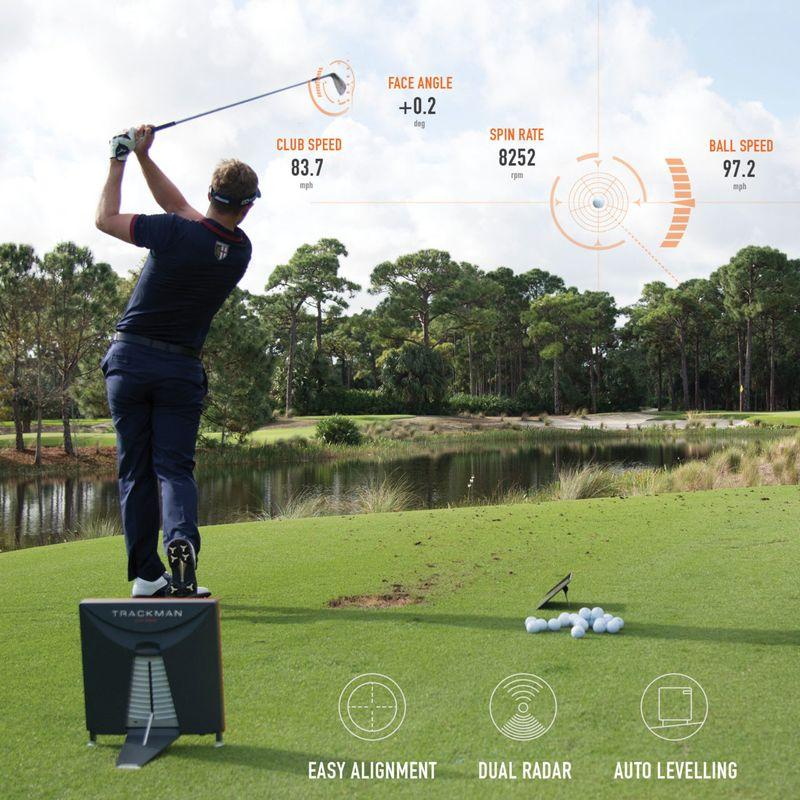
Beware vague marketingclaims about “tourlevel accuracy”. Most brands make comparative statements but publish no hard tolerancefigures. Phrases like “accurate within one mph” circulate widely yet rarely trace back to official manufacturerspecifications. The industry reference benchmark is TrackMan, whose public parameterdefinitions set the terminology used by nearly every competitor brand.
A Quick Note On Golf Rules
Under R&A Rule 4.3a: During competition rounds you may read distance or direction, but you cannot use launchmonitors to measure environmental conditions or receive interpreted recommendations such as clubselection. Penalty for first offence is general penalty; second offence brings disqualification. Launchmonitors are perfectly legal for practiceground use outside official rounds.
Final Buying Checklist Before You Purchase
- Decide what you actually want to measure. If clubdelivery data is essential, accept you may need stickers or a hybrid sensor. If only ballflight and strikequality matter, you might not need expensive clubtracking features at all.
- Measure your room: depth and ceilingheight first. If space is tight, lean toward camerabased systems. If you mostly practise outdoors, prioritise radar.
- Calculate total multiyear ownership cost: add subscriptions and consumables, not only retailprice.
- Accept indoor carrydistance numbers are modelled. Use them for relativecomparison between your own shots, not absolute realcourse yardages.
- Alternative option: If you only need occasional data, a professional clubfitting session can answer most of your questions for far less money than buying a homeunit.
Frequently Asked Questions
Q: Which launchmonitor is best for homeuse? A: SkyTrak ST MAX for most indoor homebays. For golfers practising mostly outdoors, FlightScope Mevo Gen2 is superior.
Q: Do I need special golfballs? A: Only FlightScope Mevo Gen2 requires specialmarked balls or stickers for accurate indoor spinreadings. Bushnell and Garmin need stickers on clubs, not balls. SkyTrak ST MAX uses standard balls and clubs.
Q: Can I compare my monitor’s distance numbers directly to my friend’s unit? A: Not reliably. Modelled distance outputs vary between brands, softwareversions, altitudeandtemperaturesettings. Best use one unit to track your own progress over time.
Q: Is a launchmonitor guaranteed to improve my golf? A: Only if you act on measured metrics like ballspeed, launchangle and spin. Obsessing over modelled carryyardage will teach you very little.